
快速精通SQL
重点知识
SQL执行顺序:
1.FROM & JOIN → 2. WHERE → 3. GROUP BY → 聚合函数 → 4. HAVING → 窗口函数 → 5. SELECT → 6. ORDER BY → 7. LIMIT
- FROM 和 JOIN:确定数据源
- WHERE:行级过滤
- GROUP BY:分组
- HAVING:组级过滤
- SELECT:选择列、计算窗口函数
- DISTINCT:去除重复的行
- ORDER BY:对结果进行排序
- LIMIT/OFFSET/TOP:限制返回的行数
MySQL速记
- mysql基础语法,要记忆的
- 需要提供一个结构清晰、重点突出、便于记忆的MySQL基础语法总结。内容应该:
- 覆盖最常用的操作(CRUD)
- 按照逻辑分类组织
- 强调必须记忆的关键点和语法模式
- 提供简洁的示例
- 标注易错点和注意事项
- 适合快速回顾和记忆
- 需要提供一个结构清晰、重点突出、便于记忆的MySQL基础语法总结。内容应该:
查询(DQL)
where条件查询
1 | WHERE 字段 = / != / > / < / >= / <= 值 |
聚合函数
(5个必须记住)
1 | COUNT(*) -- 统计行数(推荐*) |
连接类型
(4种必须掌握)
1 | -- 内连接(最常用) |
子查询
1 | SELECT * FROM emp WHERE salary > (SELECT AVG(salary) FROM emp); |
字符串函数
1 | concat(str1, str2) -- 拼接 |
日期函数
1 | NOW() -- 当前时间 |
数值函数
1 | round(3.1415, 2) -- 四舍五入 |
索引
(性能优化)
1 | create index idx_name ON 表名(字段); |
记忆口诀:WHERE/JOIN/ORDER BY 常用字段加索引
规则
| 规则 | 说明 |
|---|---|
| SQL不区分大小写 | 但关键字建议大写 |
| 字符串用单引号 | '文本' 不是双引号 |
注释用 -- 或 /**/ |
-- 单行注释 |
| MySQL函数名不区分大小写 | 但统一小写更规范 |
COUNT(*)>COUNT(字段) |
*统计所有行,字段统计非NULL |
GROUP BY 后SELECT字段 |
要么是分组字段,要么是聚合函数 |
基础语法
- 查询:
- Select;Where;Distinct;And;Or
- 建表、删表、分区:
- Create table;Drop table;Insert into;Partition by
- 表连接:
- 常用四类join操作:
- [inner] join;Left join;Right join;Full join
- 函数:
- 聚合函数;日期函数;数字类函数;字符类函数
- 嵌套、分组、排序:
- 双重where;Group by;Order by
- SQL三范式&注意事项:
- 三范式
- 保证每列的原子性
- 每列均与主键相关
- 每列均与主键直接相关
- 注意事项
- 小表拼大表
- 先过滤再拼表
- 避免过度嵌套
- 三范式
查询
Select 列名称 from 表名称 where 列 运算符 表名称
运算符:=, >, <, >=, <=, <>, !=, between, like, in, %, is null, is not null
1 | Select * from edw_cdm.dim_trx_loan where dt in (‘2021-02-28’,’2021-03-31’); --取月末数据 |
比较运算符(直接比)
适用:数值、日期、字符串的等于 / 不等于 / 大小比较。
关键符号:
=(等于)、>/<(大于 / 小于)、>=/<=(大于等于 / 小于等于)、<>/!=(不等于)。
范围运算符(圈范围)
between ... and:取连续范围(含边界),如 “score between 80 and 90”。in (值1,值2):取离散值列表,如 “address in (‘ 北京 ‘,’ 上海 ‘)”;加not则排除。
模糊匹配(查部分)
仅用于字符串,需搭配
%(任意字符)或_(单个字符)。示例:
name like '张%'(姓张)、name like '%晓%'(含 “晓” 字)。
空值判断(判空值)
- 不能用
=,必须用is null(为空)或is not null(不为空),如 “address is null”。
- 不能用
组合逻辑(多条件)
- 用
and(同时满足)或or(满足一个)组合条件,如 “age>18 AND score>80”。
- 用
建表、删表、分区
create table 表名称 (列名称1 数据类型, 列名称2 数据类型, 列名称3 数据类型…)
1 | create table sql_grammar_cust_base |
partitioned by注:分区可以存储更多的数据,并优化查询效率,写代码时注意限制分区字段
1 | drop table if exists aaa_tmp; |
分区和非分区的区别
逻辑上没有区别,主要区别在于物理存储上, hive表的数据以文件形式存储,分区表按照分区列的值分别存储,一个分区对应一个目录,非分区表只有一个目录。
分区的目的是为了提高查询效率和回溯历史状态,具体表现为:
- 提高查询效率。如果没有分区,每次全表扫描,对于数据量大的表查询效率低下,分区表通过限制分区,只需扫描部分分区数据,大大提高查询效率。
- 回溯历史状态。Hive分区表大部分通过增量+全量的方式更新,如果当天的数据出错,可以通过前一天的分区快速修复;通过记录月末快照分区,可以回溯历史状态,可用于分析和定位问题。
100个球,10种颜色,各有10个,编号1-10
- 非分区表:所有球装在一个大袋子里
- 分区表:每种颜色的球分别装在对应颜色的小袋子里,然后再装到大袋子里
需求:找出白色3号球
- 非分区表:全表扫描,从100个球中找出白色3号球
- 分区表:局部扫描,从白
- 色小袋子里找,从10个球中找出白色3号球
表连接
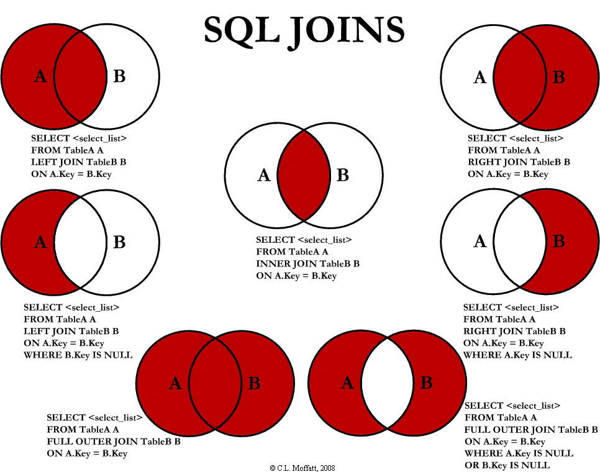
✅ 总结记忆口诀:
| join 类型 | 返回结果 |
|---|---|
| inner join | 两表交集 |
| left join | 左表全量 + 右表匹配 |
| right join | 右表全量 + 左表匹配 |
| full outer join | 两表并集(含所有记录) |
| left/right join + where null | 仅返回左/右表独有的记录 |
| full outer join + where null | 仅返回两表中不匹配的记录(对称差) |
📌 提示:
- 实际使用中,
inner join最常用。 left join常用于“主表 + 关联表”的场景(如订单 + 用户信息)。left join ... where b.key is null(左外连接排除内连接)也常用。full outer join在某些分析场景有用,但性能开销较大。- 使用
where ... is null是筛选“无匹配记录”的关键技巧。
图中涉及的 JOIN 类型:
left join(左连接)
图示:红色区域包括
A的全部 +A ∩ Bselect <select_list> from table a left join table b on a.key = b.key
含义:返回左表(tablea)的所有记录,以及右表(tableb)中匹配的记录。如果右表无匹配,则对应字段为
null。
inner join(内连接)
图示:仅红色区域为
A ∩ B(交集)select <select_list> from table a inner join table b on a.key = b.key
含义:只返回两个表中键值匹配的记录,即交集部分。
right join(右连接)
图示:红色区域包括
B的全部 +A ∩ Bselect <select_list> from table a right join table b on a.key = b.key
含义:返回右表(tableb)的所有记录,以及左表(tablea)中匹配的记录。如果左表无匹配,则对应字段为
null。
left join … where b.key is null(左外连接排除内连接)
图示:红色区域仅为
A - (A ∩ B)(左表独有部分)1
2select <select_list> from table a left join table b on a.key = b.key
where b.key is null含义:返回左表中没有在右表中找到匹配的记录,常用于查找“孤儿记录”。
full outer join(全外连接)
图示:红色区域为
A ∪ B(并集),即两个表的所有记录select <select_list> from table a full outer join table b on a.key = b.key
含义:返回两个表中的所有记录。
若某一侧无匹配,则该侧对应字段为
null。
full outer join … where a.key is null or b.key is null(全外连接排除内连接)
图示:红色区域为
(A - B) ∪ (B - A)(对称差集)1
2select <select_list> from table a full outer join table b on a.key = b.key
where a.key is null or b.key is null含义:返回仅在一个表中存在的记录,即两个表中不匹配的部分。
函数
| 聚合函数 | 日期函数 |
|---|---|
求和sum() 求均值 avg() 计数 count() 求最大值 max() 求最小值 min() 注意:null值不包含在计算中 例:人均VS有贷人均是否响应 |
返回日期加上指定天数的结果:date_add(date, n) 返回日期加上指定月的结果: add_months(date, n) 返回两个日期的差: datediff(date1, date2)(备注date1-date2) 返回两个日期的月份差: months_between(date1, date2) 返回这个月末的日期: last_day(date) 例:分区表限制 dt=last_day('2025-04-19') |
| 数字类函数 | 字符类函数 |
|---|---|
求绝对值abs()向上取整 ceil(n)向下取整 floor(n)四舍五入 round(n, len)求指数值 exp(n)求对数值 log(n)求正弦值 sin(n)求余弦值 cos(n) |
求长度length(n)字符串截取 substr(s, start, [length])<br />字符串拼接 concat(s1, s2)<br />字符串替换 replace(S1, s1, S2)<br />切割函数 split_part(s,delimiter,field)split_part(字段,分隔符,子串位置(从1开始计数)) |
嵌套、分组、排序
嵌套
select * from sql_grammar_cust_base where cust_id in (select cust_id from sql_grammar_lon_base); –不加t
Select * from (select cust_id from sql_grammar_lon_base) t; –加t
- 在 PB 级场景下,建议直接用
JOIN替代IN子查询,效率更稳定 - 在 SQL 中,
JOIN(默认指INNER JOIN,内连接)
详细解析:
- 第一个查询(
IN子查询,不加别名)
特点:
IN子查询不需要别名,因为它作为值列表直接参与条件判断。数据库会自动处理子查询结果与外部条件的关联。
- 第二个查询(派生表子查询,必须加别名)
特点:
- 该临时表必须指定别名(这里是
t),否则会报语法错误。 - 派生表(Derived Table)是完整的临时结果集,必须通过别名引用。
- 常用于复杂查询中的中间步骤。
- 在 PB 级场景下,建议直接用
分组
group by
与聚合函数搭配使用
聚合函数(如
SUM,AVG,COUNT,MAX,MIN)排序
Select 列 from 表 order by 列 asc/desc
1 | -- 按客群随机抽样(招行1w人,生活号2w人,共3w人 |
- 随机函数差异:
- MySQL:
order by rand() - PostgreSQL:
order by random() - SQL Server:
order by newid()(生成随机GUID排序) - Oracle:
order by dbms_random.value()
- MySQL:
- 潜在问题:
ORDER BY RAND()在大数据量时性能极差(需全表扫描并排序)。
- 性能优化:
rand()在大数据量表中效率低(需全表扫描并生成随机数),可先缩小范围再抽样
| SQL功能 | 核心函数/语法 | 典型场景 |
|---|---|---|
| 按条件随机抽样 | Order by rand() + row_number() + where 筛选 | 客群分层抽样、AB测试样本选取 |
三范式
每列/每个属性都是不可再分的原子单元/数据单元
比如:地址这个字段应该被拆分成省份、城市、街道…
在一个数据库表中,一个表中只能保存一种数据
在一个数据表中,每列应该与主键直接相关,而不是间接相关
注:hive使用的是一种类SQL语言,没有所谓的主键,也不需要满足的标准的SQL三范式,但是在语法上与SQL基本一致
注意事项
| 小表拼大表 | 我们常用的Left join是从右表找左索引的,左表小的话搜索次数少,效率高 |
|---|---|
| 先过滤再拼表 | 拼表之前先加where限制,筛选出符合条件的子表,减少每个阶段的数据量 |
| 避免过多嵌套 | 避免一段代码嵌套太多逻辑,多使用中间表来完成 |
我们常用的Left join是从右表找左索引的,左表小的话搜索次数少,效率高
拼表之前先加where限制,筛选出符合条件的子表,减少每个阶段的数据量
避免一段代码嵌套太多逻辑,多使用中间表来完成
SQL的规范与优化
常见的SQL不规范类型
全量分区表没有加分区限制
where限制dt,避免不必要的全分区扫描,养成限制分区的好习惯;避免无意义字段的返回,可以有效提升查询效率。udf.getmaxpar通常是一个自定义函数(UDF,User-Defined Function),从命名推测其功能可能是 “获取某个参数(Parameter)的最大值”- 避免
SELECT *:只查需要的列
笛卡尔积相关
- 多表关联时漏写部分关联条件(无 ON 条件)
- 规范写法:明确每两张表之间的关联关系,确保关联条件逻辑正确,必要时通过业务主键(如 user_id、order_id)关联。
- 笛卡尔积关联的数据量是N*M,尽量避免使用笛卡尔积关联
索引列 / 分区列上使用函数
- 不规范表现:
- 数据库:
SELECT * FROM user WHERE SUBSTR(phone, 1, 3) = '138';(phone 为索引列,使用了 SUBSTR 函数) - 数仓:
SELECT * FROM dwd_order_di WHERE DATE_FORMAT(dt, 'yyyy-MM') = '2024-01';(dt 为分区列,使用了 DATE_FORMAT 函数)
- 数据库:
- 核心影响:数据库无法使用 phone 列的索引,数仓无法下推分区过滤,均会触发全表 / 全分区扫描。
- 规范写法:将函数逻辑转移到等号右侧:
- 数据库:
SELECT * FROM user WHERE phone LIKE '138%'; - 数仓:
SELECT * FROM dwd_order_di WHERE dt BETWEEN '20240101' AND '20240131';
- 数据库:
- 不规范表现:
隐式类型转换
- 不规范表现:
SELECT * FROM order WHERE order_id = 123456;(order_id 实际为 VARCHAR 类型,传入了数值 123456) - 核心影响:数据库会对每一行的 order_id 进行
CAST(order_id AS INT)转换,导致索引失效,触发全表扫描。 - 规范写法:确保传入的参数类型与表字段类型一致,如
WHERE order_id = '123456';
- 不规范表现:
相关子查询
外层每一行都触发一次****子查询
SELECT a.user_id, (SELECT b.name FROM user b WHERE b.id = a.user_id) AS user_name FROM order a;
核心影响:若外层表有 100 万行,子查询会执行 100 万次,性能极低,相当于 “循环嵌套查询”。
用 JOIN 替代相关子查询,将多次查询转为一次关联查询:
1
2
3select a.user_id, b.name as user_name
from order a
left join user b on a.user_id = b.id;
SQL优化的技巧
分区限制
增量分区表添加分区限制,减少扫描的数据量
先过滤再关联
核心优化逻辑:减少参与关联的数据集大小,避免大表直接关联导致的性能损耗。
优化前:
先关联两张大表,关联后才用where筛选条件,导致关联的数据量极大
1 | select dt, count(distinct usr_id) as num |
方案1:关联时直接添加过滤条件
在on时就筛选
1 | select a.dt, count(distinct a.usr_id) as num |
方案2:子查询先过滤单表,再关联(效率更优)
先分别where筛选需要的数据,再join关联表
1 | select a.dt, count(distinct a.usr_id) as num |
先过滤再使用复杂函数
优化前:
1 | select usr_id, pvc |
优化后:
1 | select |
提前过滤null
- JOIN倾斜-大表关联大表
两个大表关联,如果关联字段包含大量无效值(NULL、空值等)或有大量重复数据,关联之后会导致数据倾斜,数据倾斜的特征是脚本执行过程中长时间卡在99%。
- 倾斜值为无效值(NULL,空串等),如果无效值不需要,则直接过滤。
优化前:
1 | -- 申请基表和申请标签表分别有几千万笔案件的客户号为空 |
优化后:
1 | -- 过滤无效值 |
- 倾斜值为无效值(NULL,空串等),如果无效值需要保留,则先对无效值进行随机处理。
用group by去重
- Reduce倾斜-
distinct - 用
group by替代distinct去重
distinct会导致最后只有一个reducer,而group by会分发到不同的reducer上。考虑用group by代替。
1 | -- 优化前 用时276s |
刷7大类型SQL题
题型基本覆盖面试90%的问题!
- 排序类问题(普通排序,组内排序)
- TOPN 问题
- 用户留存、复购率、完播率等计算复合指标问题
- 新用户数、用户间隔连续登录天数、最长连续登陆问题
- 偏移类求和求平均问题(lag, lead函数)
- 行列互转问题
- 中位数问题
- 每个问题的相关的函数和语法有哪些,有没有哪些问题这7类没总结的
- 对 7 大类型 SQL 面试题,结合 PostgreSQL 语法给出典型例题及答案
- 对 7 大类型 SQL 面试题,结合 PostgreSQL 和trino语法分别给出典型例题及答案,用最少的表和字段完成所有示例,关键字用小写,示例要解释语法的使用和用到的函数
- PostgreSQL 和trino语法分别给出答案,关键字用小写
排序类问题(普通排序,组内排序)
普通排序:使用order by对查询结果进行排序。
组内排序:使用窗口函数row_number(), rank(), dense_rank()等,在分组内进行排序。
配合 PARTITION BY进行分组,ORDER BY在组内排序
- 排序函数:row_number(), rank(), dense_rank(), tnile()
- ASC/DESC
1 | row_number() over(partition by region order by dt) -- 连续不重复排名 |
ROW_NUMBER(): 连续唯一序号(1,2,3,4)RANK(): 并列时排名相同,后续序号跳过(1,2,2,4)DENSE_RANK(): 并列时排名相同,序号连续(1,2,2,3)NTILE(): 分桶,常用于五分位、十分位等
例题:有表1(region地区,dt日期,sales销售额),按地区分组,给每天的销售额按降序排组内名次(允许并列,不跳号)。
select region |
TOPN 问题
使用窗口函数或子查询来获取每个组内前N条记录。
- 使用
row_number()配合where条件 - 或者使用
limit()(在MySQL/PostgreSQL)或TOP(在SQL Server)等
1 | -- 使用窗口函数 |
全局TOPN
语法:1
2
3
4
5
6select * from(
select *,row_number() over(order by 排序列 DESC) as rn
from 表名
)t
where rn<=N
;示例:取销售额前3的订单
分组TOPN
语法:1
2
3
4
5
6select * from(
select *,row_number() over(partition by 分组列 order by 排序列 DESC) as rn
from 表名
)t
where rn<=N
;示例:取每个地区销售额前2的订单
用户留存、复购率、完播率等计算复合指标问题
这类问题通常需要计算比率,例如用户留存率是计算某天新增的用户在后续某天仍然活跃的比例。
- 常用日期函数:
date_diff(),date_add()等 - 聚合函数:
sum(case when ...),count(distinct ...) - 条件表达式:case when, if
- 小数保留n位数:
round(expr, n) - 数据类型转换:
cast(expr as decimal)
PostgreSQL
expr + INTERVAL '1 day'
Trino
date_add('day', 1, expr)
新用户数、用户间隔连续登录天数、最长连续登陆问题
- 常用窗口函数:
lag()、lead(),用于获取前后行的数据 - 日期函数:
date_diff()、timestamp_diff(),计算时间间隔 - 使用变量或窗口函数来分组连续登录
PostgreSQL
expr +/- INTERVAL '1 day'
Trino
date_add('day', 1, expr)
抖音电商数据分析笔试SQL题
1、有一张订单表(order_info),表结构如下:order_id、goods_id、order_time、order_gmv
问题:请统计2024年9月10日这天销量金额前10的商品信息。
要求:排名相同的一起作为同排名次序输出
2、有一张用户登录表(user_login_log),表结构如下:uid、login_time
问题:请统计2024.9.1之前活跃过,但是9.1之后再也没有活跃过的用户
创建表并帮我填入一些数据
解法是最高效率的吗,bp级数据可用不
商品销量排名前10:
1
2
3
4
5
6
7
8
9
10
11
12
13
14
15
16
17
18
19
20
21
22
23
24
25
26
27
28
29
30
31
32
33
34-- 2层子查询
select
good_id
,order_gmv
,rank
from(
select
good_id
,order_gmv
,dense_rank() over(order by total_gmv desc) as rank
from(
select
good_id
,sum(order_gmv) as total_gmv
from order_info
where cast(order_time as date) = '2024-09-10'
group by good_id
) as res
) as res
where rank <= 10
-- 1层子查询
select
rank_num, goods_id, total_gmv
from (
select
dense_rank() over (order by sum(total_gmv) desc) as rank
,goods_id
,sum(order_gmv) as total_gmv
from order_info
where cast(order_time as date) = '2024-09-10'
group by goods_id
) t
where rank <= 10;用户流失分析:
1
2
3
4
5
6
7
8
9
10
11
12
13
14
15
16
17
18
19
20
21
22
23
24
25
26
27
28
29
30
31
32
33
34
35
36
37-- 不写CTE
select
t.uid
from(
select
uid
from user_login_log
where login_time <= '2024-09-01'
group by uid
) as t
left join(
select
uid
from user_login_log
where login_time > '2024-09-01'
group by uid
)as t1
on t.uid=t1.uid
where t1.uid is null
-- 写CTE
with tmp_before as(
select uid
from user_login_log
where login_time <= '2024-09-01'
group by 1
)
, tmp_after as(
select uid
from user_login_log
where login_time > '2024-09-01'
group by 1
)
select t.uid
from tmp_before t
left join tmp_after t1 on t.uid=t1.uid
where t1.uid is null建表测试:
1
2
3
4
5
6
7
8
9
10
11
12
13
14
15
16
17
18
19
20
21
22
23
24
25
26
27
28
29
30
31
32
33/* PostgreSQL语法 */
-- 创建订单表
create table order_info (
order_id int primary key,
goods_id int,
order_time timestamp,
order_gmv decimal(10, 2)
);
-- 插入测试数据(2024年9月10日)
insert into order_info values
(1001, 101, '2024-09-10 08:30:00', 299.99),
(1002, 102, '2024-09-10 09:15:00', 1500.00),
(1003, 103, '2024-09-10 10:20:00', 899.50),
(1004, 101, '2024-09-10 10:45:00', 299.99),
(1005, 102, '2024-09-10 11:00:00', 1500.00),
(1006, 104, '2024-09-10 11:30:00', 599.99),
(1007, 105, '2024-09-10 12:00:00', 2299.00),
(1008, 101, '2024-09-10 12:45:00', 299.99),
(1009, 106, '2024-09-10 13:20:00', 450.00),
(1010, 102, '2024-09-10 14:00:00', 1500.00),
(1011, 107, '2024-09-10 14:30:00', 3499.99),
(1012, 103, '2024-09-10 15:00:00', 899.50),
(1013, 108, '2024-09-10 15:45:00', 199.99),
(1014, 105, '2024-09-10 16:20:00', 2299.00),
(1015, 109, '2024-09-10 17:00:00', 799.99),
(1016, 101, '2024-09-10 17:30:00', 299.99),
(1017, 110, '2024-09-10 18:00:00', 1099.00),
(1018, 102, '2024-09-10 18:45:00', 1500.00),
(1019, 107, '2024-09-10 19:20:00', 3499.99),
(1020, 111, '2024-09-10 20:00:00', 599.50);
select * from order_info;1
2
3
4
5
6
7
8
9
10
11
12
13
14
15
16
17
18
19
20
21
22
23
24
25
26
27
28
29
30
31
32
33
34
35
36
37
38
39
40
41
42
43
44
45
46
47
48
49
50
51
52
53
54/* PostgreSQL语法 */
-- 创建用户登录表
create table user_login_log (
uid int,
login_time timestamp
);
-- 插入测试数据
-- 用户1001: 9月1日前活跃,之后未活跃(流失用户)
insert into user_login_log values
(1001, '2024-08-25 10:30:00'),
(1001, '2024-08-28 14:20:00'),
(1001, '2024-08-31 18:45:00');
-- 用户1002: 9月1日前活跃,之后也活跃(保留用户)
insert into user_login_log values
(1002, '2024-08-20 09:00:00'),
(1002, '2024-08-30 15:30:00'),
(1002, '2024-09-05 11:20:00'),
(1002, '2024-09-15 16:45:00');
-- 用户1003: 9月1日前活跃,之后未活跃(流失用户)
insert into user_login_log values
(1003, '2024-08-15 10:00:00'),
(1003, '2024-08-22 13:30:00'),
(1003, '2024-08-29 20:15:00');
-- 用户1004: 仅在9月1日后活跃(新用户,不符合条件)
insert into user_login_log values
(1004, '2024-09-10 12:00:00'),
(1004, '2024-09-18 14:30:00');
-- 用户1005: 9月1日前活跃,之后也活跃(保留用户)
insert into user_login_log values
(1005, '2024-08-10 08:00:00'),
(1005, '2024-08-25 17:45:00'),
(1005, '2024-09-08 09:20:00'),
(1005, '2024-09-20 19:00:00');
-- 用户1006: 9月1日前活跃,之后未活跃(流失用户)
insert into user_login_log values
(1006, '2024-08-05 11:30:00'),
(1006, '2024-08-31 15:20:00');
-- 用户1007: 9月1日前活跃,之后未活跃(流失用户)
insert into user_login_log values
(1007, '2024-08-12 10:00:00'),
(1007, '2024-08-26 13:15:00');
-- 用户1008: 仅在9月1日后活跃(新用户)
insert into user_login_log values
(1008, '2024-09-22 11:00:00');
select * from user_login_log;
偏移类求和求平均问题(lag, lead函数)
- 窗口函数:
lag()、lead(), 用于获取前后行的值 - 窗口函数:
sum(),avg()等结合rows/range
1 | lag(sales,1) over(partition by region order by date) as prev_sales |
- rows/range 窗口帧
- 包括左右区间
unbounded preceding分区头unbounded following分区尾interval '1 month' preceding前1个月n preceding前n行current row当前行n following后n行
分区头到分区尾:
rows between unbounded preceding and unbounded following
前n行到当前行
rows between n preceding and current row
当前行到后n行
rows between current row and n following
前n行到后n行
rows between n preceding and n following
分区头到当前行
rows between unbounded preceding and current row
当前行到分区尾
rows between current row and unbounded following
前一个月到当前行
range between interval '1 month' preceding and current row
继续。。。
- 同比环比
lag(expr,1),lag(expr,12)
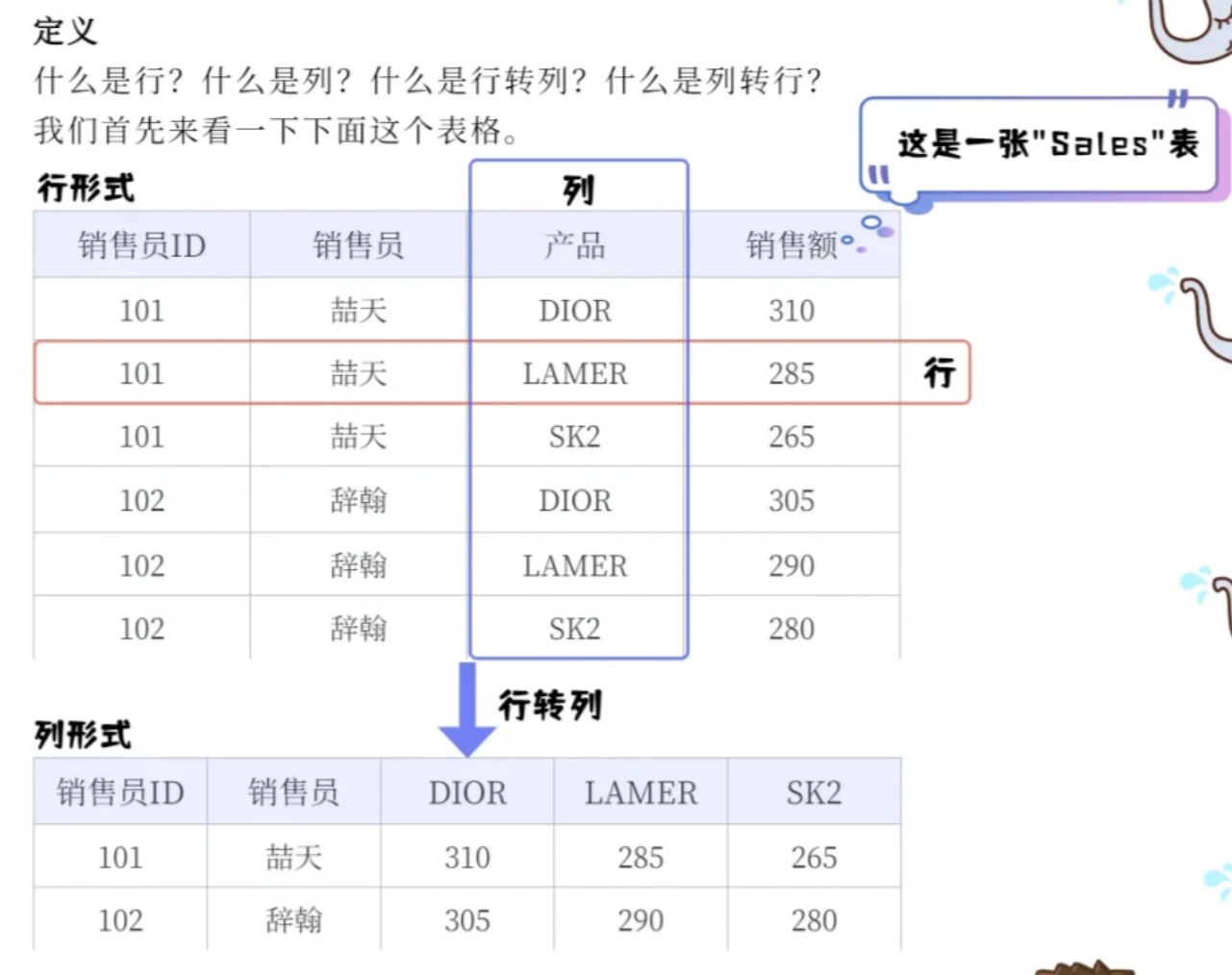
行列互转问题
- 行转列:使用
case when或pivot(部分数据库支持,如SQL Server) - 列转行:使用
union all或unpivot(部分数据库支持)
核心概念
行转列:
将某一列中的唯一值转换为新的列名,并将另一列的值填充到这些新列之下。通常伴随聚合操作。
- 示例: 将
(年份, 季度, 销售额)转换为(年份, Q1销售额, Q2销售额, Q3销售额, Q4销售额)。
- 示例: 将
列转行:
是行转列的逆操作,将多个列合并成两个列:一个用于存储原列名(键),一个用于存储原列的值(值)。
- 示例: 将
(年份, Q1销售额, Q2销售额, Q3销售额, Q4销售额)转换回(年份, 季度, 销售额)。
- 示例: 将
1 | /* 通用语法??? */ |
PostgreSQL
case whenfilter
Trino
case whenfiltercount_if
1 | /* PostgreSQL语法 */ |
中位数问题
- 方法1:使用窗口函数:PERCENTILE_CONT, PERCENTILE_DISC等(部分数据库支持,如PostgreSQL、SQL Server)
- 方法2:使用排序和计数的方法
percentile_cont(0.5) within group(order by score) as median |
PostgreSQL
percentile_cont()连续百分位数(推荐)percentile_disc()离散百分位数- 如何选择?
- 若数据是连续型(如价格、时长),且希望百分位结果更精确(允许插值),用
percentile_cont; - 若数据是离散型(如评分、数量),或要求结果必须是原始数据中的值,用
percentile_disc。
- 若数据是连续型(如价格、时长),且希望百分位结果更精确(允许插值),用
Trino
approx_percentile()
1 | /* PostgreSQL语法 */ |
通用解法:
排序求解
1 | with tmp1 as( |
count(*) over() as total_rows– 窗口函数:全表总行数(不分组)where rn in((total_rows+1) div 2, (total_rows+2) / 2)我没懂
这段条件的核心是 用一个公式同时适配 “奇数总行数” 和 “偶数总行数”,不用写 IF/CASE 判断,靠整数除法的特性自动筛选出需要的中间行。咱们用「具体例子」拆解,瞬间就能懂!
先明确两个前提
rn:按销售额排序后的唯一行号(1、2、3、…、total_rows);total_rows:数据集的总行数(比如 5 行、6 行,分别对应奇数、偶数);- 关键:SQL 里的整数除法(比如 (5+1)/2)会 自动向下取整(不用管小数部分)。
例子 1:总行数是奇数(total_rows=5)
比如数据排序后行号 rn=1、2、3、4、5,中位数是第 3 行的值。代入公式计算两个位置:
- 第一个位置:
(5+1)/2 = 3(整数除法,结果 = 3); - 第二个位置:
(5+2)/2 = 3.5(整数除法,向下取整 = 3);
所以 rn IN (3, 3) → 实际筛选 rn=3 的行(只 1 行),用 AVG 计算就是它本身(中位数 = 第 3 行的值)。
例子 2:总行数是偶数(total_rows=6)
比如数据排序后行号 rn=1、2、3、4、5、6,中位数是第 3 行和第 4 行的平均值。代入公式计算两个位置:
- 第一个位置:
(6+1)/2 = 3.5(整数除法,向下取整 = 3); - 第二个位置:
(6+2)/2 = 4(整数除法,结果 = 4);
所以 rn IN (3, 4) → 筛选出第 3 行和第 4 行,用 AVG 计算就是这两个值的平均(中位数 =(第 3 行 + 第 4 行)/2)。
一句话总结公式的巧妙之处
- 奇数行:两个公式算出来的位置 相同 → 只取 1 行;
- 偶数行:两个公式算出来的位置 相邻 → 取 2 行;
其他问题
UNION ALL:合并结果
自连接 (Self Join): 用于比较表内相同记录(例如,查找薪资高于其经理的员工,查找重复记录)。
字符串处理: 文本提取、拼接、模式匹配等。
日期/时间处理: 复杂的日期计算、跨时区处理、时间窗口聚合等。
地理空间查询: 使用 PostGIS 等扩展进行空间数据分析(在 PostgreSQL 中常见)。
数据倾斜处理: 在分布式 SQL 引擎(如 Trino)中,如何识别和处理因数据分布不均导致的性能问题。
类型转换
日期/时间戳→数值
各数据库的替代写法
| 数据库 | 写法 |
|---|---|
| PostgreSQL | extract(epoch from date) |
| Trino | to_unixtime(date) |
| MySQL | unix_timestamp(date) |
| Hive | unix_timestamp(date) |
为什么Unix时间戳更适合回归分析
- Unix时间戳: 每天均匀增加
86400秒,适合线性回归 - YYYYMMDD格式: 数字跳跃很大(
20250901→20250902),且间隔不均匀
函数语法
全部都支持通用标准转换:cast(expr as type)
| 数据库 | 专用转换函数 | 字符串→日期 | 日期→字符串 | 字符串→整数 |
|---|---|---|---|---|
| PostgreSQL | ::操作符 |
cast(expr as date) |
cast(expr as text) |
cast(expr as integer) |
| Trino | try_cast() |
cast(expr as date) |
cast(expr as varchar) |
cast(expr as integer) |
| MySQL | convert(),cast() |
cast(expr as date) |
cast(expr as char) |
cast(expr as signed) |
| Hive | 无try_cast |
cast(expr as date) |
cast(expr as string) |
cast(expr as int) |
不同数据库中的数据类型转换,数据库类型按照企业级分类
| 分类 | 数据库 | 标准CAST | 推荐/专用转换语法 | 核心特点与注意事项 |
|---|---|---|---|---|
| 🔒 传统OLTP | PostgreSQL | ✅ | expr::type to_char(expr) extract(epoch from expr) |
类型系统最严格,转换失败直接报错。功能最丰富,支持自定义类型和运算符。 |
| MySQL | ✅ | CONVERT(expr, type) DATE_FORMAT(...) CAST(expr as signed) |
隐式转换宽松,可能导致意外结果。例如,字符串转数字会截取开头部分。 | |
| 🚀 大数据OLAP | Trino/Presto | ✅ | try_cast(expr as type) to_unixtime(expr) format_datetime(expr) |
强调稳定性。try_cast转换失败返回NULL,是ETL任务首选。类型名多用VARCHAR。 |
| Spark SQL | ✅ | try_cast(expr as type) (新版本) date_format(...) unix_timestamp(...) |
与Trino理念类似,但函数名更接近Hive。处理脏数据时推荐使用try_cast。 |
|
| Hive | ✅ | unix_timestamp(...) from_unixtime(...) date_format(...) |
“读时模式”,转换相对宽松。版本间行为可能有变(如Hive 3时间戳时区处理)。 | |
| 🌐 云原生HTAP | TiDB | ✅ | CONVERT(expr, type) DATE_FORMAT(...) |
高度兼容MySQL语法,但作为分布式系统,某些函数(如CONVERT)的行为旨在确保集群一致性。 |
| 📈 专用OLAP | ClickHouse | ✅ | accurateCast(expr, type) toUnixTimestamp(...) toString(...) |
类型转换函数家族庞大。accurateCast更安全(范围检查),cast会尝试尽力转换。 |
其他
临时表CTE
1 | drop table if exists aaa_tmp; |
注释
- 单行注释以两个连续的连字符
--开头 - 多行注释以
/*开头,以*/结尾,可跨越多行
别名
- 什么时候要用别名
- 列举所有情况
- 哪些情况可以省略as关键字
在 SQL 中,只要“某个东西”需要被当作一个独立的数据源来引用,就必须给它起别名。
在标准 SQL 里,别名前的关键字 AS 纯粹是“装饰”,任何场景都可以省。除了“别名本身是关键字或含空格”需要引号包裹以外,AS 写不写随你口味;主流数据库(MySQL、PG、SQL Server、Oracle、SQLite)全部允许省。
一、必须起别名(省略就报错)
| 场景 | 示例 | 不报错的写法 | 报错的写法 |
|---|---|---|---|
| 1. 派生表/内联视图 | SELECT * FROM (SELECT …) AS a |
… ) AS a |
… ) |
| 2. 公用表表达式递归部分 | WITH RECURSIVE cte(n) AS (SELECT 1 UNION SELECT n+1 FROM cte) |
递归部分引用自己 cte |
无别名无法递归 |
| 3. 窗口函数计算列 | ROW_NUMBER() OVER (…) AS rn |
… AS rn |
ROW_NUMBER() OVER(…) 裸写 |
| 4. VALUES 构造的表 | SELECT * FROM (VALUES (1),(2)) AS v(col) |
AS v(col) |
FROM (VALUES …) |
| 5. LATERAL(横向子查询) | SELECT * FROM t, LATERAL (SELECT …) AS lat |
AS lat |
无别名语法错 |
| 6. JOIN 里的匿名表 | … JOIN (SELECT …) AS j ON … |
AS j |
JOIN (SELECT …) ON … |
| 7. 多表同名字段 | SELECT a.id, b.id FROM ta a JOIN tb b |
表别名 a/b 区分 |
直接写 id 歧义报错 |
二、强烈建议起别名(不会报错,但失去可读性/功能)
| 场景 | 作用 |
|---|---|
| 8. 任何表达式/计算列 | SELECT price*qty AS amount —— 外层或应用代码好引用 |
| 9. 多表连接 | FROM user u JOIN order o ON u.id=o.user_id —— 省打字、防歧义 |
| 10. 自连接 | FROM employee e JOIN employee m ON e.manager_id=m.id —— 同表不同角色 |
| 11. 聚合函数结果 | SELECT SUM(sales) AS total_sales —— 给应用/报表一个稳定列名 |
| 12. 子查询列被外部引用 | 外层 WHERE total > 1000 需要内层 SUM(x) AS total |
| 13. 需要排序或分页 | ORDER BY rn 需要前面 ROW_NUMBER() OVER … AS rn |
| 14. 导出/BI 工具 | 列别名直接变成报表字段名,避免“?column?”、“expr_1” |
VALUES 构造的表
就是:不写真正的物理表,用“手写常量”临时造一张内存表,查询完就消失。 语法核心只有一句:
1 | VALUES (row1_col1, row1_col2, ...) |
前面再加一对括号、起个别名,就能当派生表用。
典型用途
- 快速造测试数据,不写
CREATE TABLE - 把零散常量拼成结果集,再与其他表
JOIN INSERT INTO时一次性插入多行- 在
WITH里当 CTE(PostgreSQL / MySQL 8+ 直接跑):
1 | WITH region(code, name) AS ( |
注意:若表中存在自增列、默认值列或非空约束列,不指定列名时容易因顺序错误导致插入失败,推荐优先使用 “指定列名” 的方式。
规则速记
- 每行括号里的列数必须相同
- 前面整体必须再起别名
AS alias(col1, col2, …),否则语法报错 - 数据只在本次查询生命周期存在,不会落盘
alias指别名,即给表、列或表达式起一个临时的简短名称,用于简化查询语句、提高可读性,或避免名称冲突(比如多表关联时列名重复)
格式化风格
- 关键字小写
- 字段分行罗列
- 逗号前置设计便于字段注释,也降低增删字段的出错率
- 每个逻辑块(CTE、主查询)独立成块
- 层级缩进(CTE、CASE、字段列表都有缩进)
刷题
Leetcode
牛客
1 | with tmp as( |
- 步骤1:获取每个用户每天的刷题日期(去重)
步骤2:通过自连接,将每个用户每天的记录与第二天的记录连接起来。
步骤3:统计所有的记录数作为分母,统计第二天有记录的记录数作为分子,然后计算比例。 - 自连接说的是inner join吗
- 我们通常说自连接(self-join)是指同一个表自己和自己连接,可以使用INNER JOIN,也可以使用LEFT JOIN等
1 | select |
- 日期在t2
- join时,在on子句就要过滤!
- 如果把日期条件放在
where子句中,left join会退化成inner join,无法显示未练习的用户
- question_cnt数做了多少题
- right_question_cnt把答对的题标记为1,把这些1相加
1 | with |
- 统计近7天,包含当天,就是
interval 6 day,很常用:
1 | with |
cross join因为tmp_latest只有一行,性能影响极小思路
- 库存表→
left join→销量表;另一个是门店主数据(信息表)最后再用
- 库存表→
因为要筛选窗口函数➕
coverage_days是avg_daily_qty的衍生计算- 所以再加一个CTE
1 | with |
finishers_m:当月至少完成过1节课的去重人数
count(distinct case when finished_flag=1 then student_id end)- 表study_logs_
- 字段finished_flag 非空(1=本条日志对应课节完成)
不要急着写 SQL,先把业务需求翻译成数学公式:
指标 数据来源 计算逻辑 learners_enrolledcourse_enroll_count(distinct student_id)(全量)learners_active_mstudy_logs_count(distinct student_id)(2024-08 日志)finishers_mstudy_logs_count(distinct case when finished_flag=1 then student_id end)completion_rate衍生 finishers_m / learners_active_m(防除零)total_minutes_mstudy_logs_SUM(watch_minutes)avg_minutes_per_active衍生 total_minutes_m / learners_active_m(防除零)rank_in_course衍生 同 course 内按 avg_minutes_per_active降序排名关键洞察:只有
learners_enrolled依赖报名流水,其余指标都依赖日志表。可以并行计算。独立聚合 → 各算各的,先CTE让每张表”单独干活”,避免过早 JOIN 导致数据膨胀
业务要求”每个班级一行”,即使当月无日志也要输出。因此必须以班级表为主表tmp_all
“COUNT 不怕空,SUM 会空空” →
coalesce别漏掉SUM()字段“除法先判零” → 业务零容忍除零错误
1 | with |
步骤
- 获取所有帖子中最新的发布时间,作为统计基准日(动态描点)
- 统计每位作者在近30天窗口内的发文表现。按作者id分组聚合
- 关联作者信息
易错点
- avg_likes_30d(发文为 0 时记 0)
- 这次把发文为0的也要输出,所以join的时候不用筛
==很常用的==
1 | case |
1 | case |
- case子句等价于
,coalesce(round(t1.likes_30d / nullif(t1.posts_30d, 0), 2), 0) as avg_likes_30d |
1 | with |
- 步骤
- 获取最新送达时间作为基准日
- 过滤近7天包裹,计算每单配送时长和是否准时
- 按骑手聚合统计近7天指标
- 计算排名并输出最终结果
- 易错点:
- 尽量把聚合和窗口函数用CTE分开
where orders_7d > 0- 这道题可过滤也可不过滤,但是现实情况下我们关注的都是有真实履约行为的骑手,没订单的骑手没有分析价值
- 不对,我已经做了筛选:由于
tmp_courier使用的是INNER JOIN,本身就只返回有订单的快递员。
1 | with tmp_orders as( |
商品、订单、订单明细三张表,订单表才是主键的源头
为什么用join而不是left join?
- 因为我们要统计的是 “实际产生了销售” 的品类,没有销售的品类不应该出现在报表里。
为什么要将聚合和窗口函数分开?
错误场景复现(您的原始SQL)
1
2
3
4
5
6
7
8
9
10
11
12SELECT
category,
COUNT(DISTINCT order_id) AS orders_cnt, -- ① 分组后计算
SUM(qty * price) AS revenue,
ROUND(SUM(qty * price) / COUNT(DISTINCT order_id), 2) AS avg_order_value, -- ② 使用①的结果
RANK() OVER (
ORDER BY SUM(qty * price) DESC,
COUNT(DISTINCT order_id) DESC, -- ③ 窗口函数的ORDER BY也包含COUNT(DISTINCT)
category
) AS rank_by_revenue
FROM ...
GROUP BY category;优化器Bug发生在:
- 步骤③的
COUNT(DISTINCT order_id)会被缓存 - 步骤②的
COUNT(DISTINCT order_id)错误地引用了步骤③的缓存值 - 而步骤③的
COUNT(DISTINCT order_id)是窗口函数级别的聚合(非分组后)
- 步骤③的
步骤
- 筛选目标月份的订单(
orders表)。 - 把订单明细、商品信息关联起来,得到每条订单明细(join)
- 按品类聚合,再用窗口函数
- 筛选目标月份的订单(